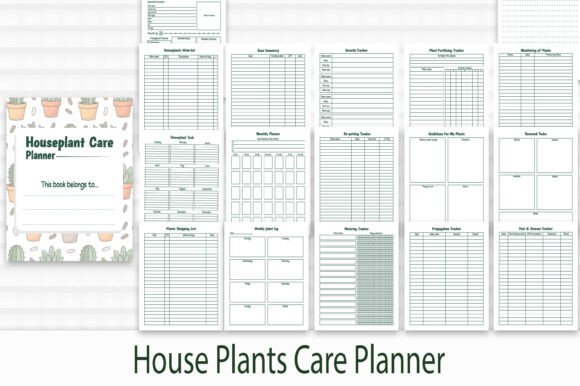
House Plants Care Planner
Whether you’re nurturing your first pothos or managing a greenhouse-sized collection, consistent, thoughtful care makes all the difference. The House Plants Care Planner is designed to support that consistency—not as a rigid schedule, but as a flexible, visually clear system for tracking watering, fertilizing, pruning, repotting, light adjustments, and seasonal shifts. It’s especially valuable for people who juggle multiple plants across different rooms, light conditions, and growth stages—and who want clarity without clutter.
Why This Isn’t Just Another Printable Calendar
Unlike generic planners or apps that treat all plants the same, the House Plants Care Planner was built with botanical nuance in mind. Its 18-page layout includes dedicated sections for individual plant profiles—space to note species, purchase date, pot size, soil type, and observed growth patterns—plus monthly and seasonal action logs. What sets it apart is its format: you get AI, PDF, SVG, and high-resolution JPEG files, plus 17 clean, CMYK-optimized PNG clip art pieces—all at 300 DPI. That means whether you’re printing professionally, embedding into a digital dashboard, or adapting elements for client handouts or social media posts, fidelity and flexibility are built in.
A Common Mistake: Assuming Format Equals Functionality
Many buyers focus only on file types—“Oh, it has SVGs!”—without checking how those files actually integrate into their workflow. For example, someone using Canva might assume an SVG will paste cleanly, only to find layers flattened or colors shifted because the file wasn’t exported with web-safe transparency or RGB/CMYK alignment in mind. Similarly, downloading the PDF without verifying bleed margins or print-ready settings can lead to cropped borders or misaligned grids when printed at home or sent to a local print shop.
This isn’t about technical fault—it’s about expectations. The House Plants Care Planner delivers professional-grade assets, but their usefulness depends on matching them to your tools and goals. A freelance educator creating classroom handouts needs CMYK PNGs for crisp inkjet printing; a content creator building Instagram carousels benefits more from layered SVGs or transparent PNGs optimized for digital use. Confusing the two doesn’t break the planner—but it slows you down and adds avoidable revision time.
Overlooking Color Mode—and Why It Matters
CMYK color mode is included intentionally, not as an afterthought. If you plan to print physical copies (especially for resale, workshops, or branded merch), CMYK ensures what you see on screen closely matches final output—no surprise green shifts or muted reds. But here’s where people stumble: opening a CMYK PDF in a non-color-managed viewer (like some mobile PDF readers) or converting it hastily to RGB for digital use can dull contrast and muddle text legibility.
Better approach? Use the PDF version for printing and reference, and pull individual elements (like icons or headers) from the PNG or SVG folders when designing digitally. The 17 included PNG clip art pieces are pre-optimized—no need to re-trace or re-color. They’re sized for quick drag-and-drop into newsletters, lesson plans, or product packaging—saving hours over sourcing or editing generic stock graphics.
Assuming “High Resolution” Means “Universal Fit”
Yes, all images are 300 DPI—but resolution alone doesn’t guarantee usability. A 300 DPI JPEG of a full-page planner grid may be huge in file size (15+ MB), making it unwieldy for email attachments or slow-loading websites. Meanwhile, the same grid as a vector-based SVG stays lightweight and infinitely scalable—ideal for responsive web use or large-format prints.
So before downloading or sharing, ask: What’s my primary use case? Printing workshop kits? Use the PDF or CMYK PNGs. Building a Notion template? Extract key icons as SVGs. Creating a printable workbook for clients? Combine the PDF layout with selected PNGs for visual accents. Matching file type to purpose prevents frustration—and avoids unnecessary resizing, compression, or reformatting later.
Skipping the “Test Print” Step
Even with perfect files, printer settings can undermine results. Margins, scaling, and paper type affect readability—especially for fine lines in care calendars or small-font notes sections. One small business owner printed 50 copies of her custom plant-care booklet, only to discover the weekly checkboxes were slightly clipped on every page because her default printer setting scaled to “fit.”
Solution? Print one test page first—preferably on the same paper stock you’ll use for the final run. Check alignment, font weight, and checkbox spacing. If you’re using the AI file in Adobe Illustrator, verify that fonts are outlined and that crop marks are toggled on if needed. These aren’t extra steps—they’re efficiency safeguards.
Underestimating How Much You’ll Customize
The House Plants Care Planner isn’t meant to be used straight out of the download folder. Its real strength lies in adaptation: adding your own plant abbreviations, color-coding by room or care intensity, inserting photos next to entries, or combining pages into a spiral-bound journal. That’s why layered SVGs and editable AI files matter—they let you adjust spacing, swap icons, or rebrand headers for your audience.
But customization requires knowing what’s editable—and what’s fixed. The 17 PNG clip art pieces are ready-to-use, but not editable in terms of shape or color without raster editing. The SVGs? Fully adjustable in vector editors. The AI file? Fully editable—including typography, swatches, and master page structure. Knowing which asset serves which need helps you spend time enhancing—not wrestling with—your planner.
What to Check Before You Download or Buy
- Verify your software compatibility: Do you have access to Illustrator (for AI), a vector editor (for SVG), or a PDF reader that supports form fields and annotations?
- Clarify your end use: Is this for personal tracking, client deliverables, resale products, or educational materials? That determines which files you’ll rely on most.
- Review the color profile: If printing commercially, confirm your vendor accepts CMYK PDFs—and whether they require specific ICC profiles.
- Scan the page count and structure: The 18-page layout includes cover, instructions, plant logs, monthly trackers, and seasonal notes—not just blank grids. Make sure that matches your planning rhythm.
- Check resolution context: 300 DPI applies to raster files (JPEG, PNG); vector files (SVG, AI) scale infinitely—so resolution isn’t a concern there.
Choosing and using the House Plants Care Planner well isn’t about perfection—it’s about alignment. Aligning format with function. Aligning tools with intention. Aligning care habits with plant needs. When those pieces connect, what starts as a simple download becomes part of a more grounded, intentional practice—whether you're growing basil on a windowsill or scaling a plant-based brand.